Изменение целевой группы: Технические специалисты
The function template is used to display an individual user, room or audio source selection for up to four objects. The number of fields (one to four) and the symbols to be displayed (user, room or audio sources) are determined using parameters. Each click on the corresponding field sends the value 1 on the assigned communication object. Optional status objects for each field enable the ON status to be displayed in the corresponding field.
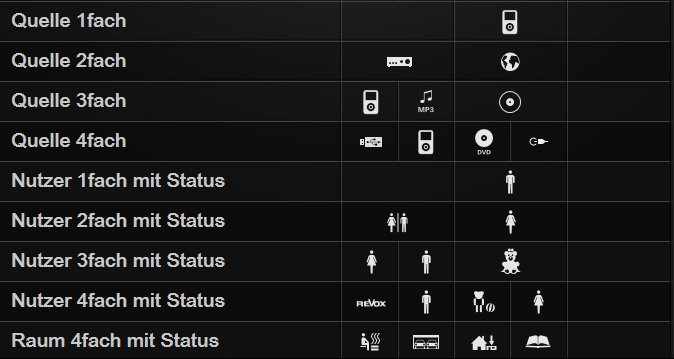
Icons from the following subjects can be set for each field:
Application example: Up to four audio sources, users or rooms can be activated on a line using the function template. A combination of user, room and audio source operation is also possible. The function template can be used together with the VoxNet Revox multiroom system for user or source switching, for example. The currently active source, room or user is visualised using the optional status display.
Hard- und Softwareversionen: Gira HomeServer from version 4.2.1, QuadClient from version 4.2.1
Kompatible Geräte: iPhone, iPad, Android, Gira Control Clients
Gira Hardware: 0x keine Hardware benötigt; 0x keine Hardware benötigt; 1x 052900 KNX/EIB Gira HomeServer / FacilityServer
Bekannte Ausnahmen: Requires Experte 4.2.1 and QC 4.2.1
Realisierungsdauer: 1h
